Skip to content

STILL ADDING UP LINE ITEMS WITH A CALCULATOR?THERE’S A BETTER WAY.

Black Bolt turns claim PDFs into decisions, inspections and measurements into estimates, and missed items into revenue.

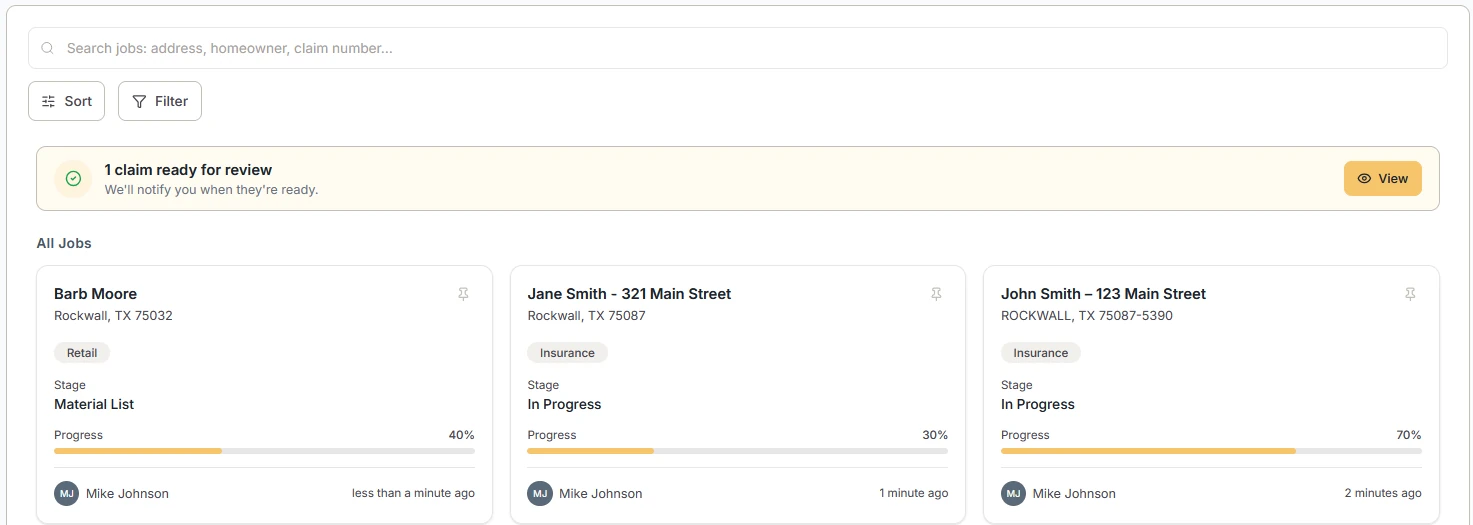
Black Bolt job pipeline: a search bar, a claim-ready-for-review notice, and job cards showing each job's type, stage, and progress.

SOUND FAMILIAR?

Manual math. Re-checking PDFs. Re-entering inspection data. Missed supplements. Slower close times.

Adding up line items with a calculator, one claim PDF at a time.

Retyping field notes from the inspection once you are back at the desk.

Guessing at roof dimensions, or keying them in by hand.

Working out material and labor quantities from scratch on every job.

Redoing the math every time the scope changes.

Three vents on the claim, five on the roof, and nobody caught it.

FROM CLAIM TO QUOTE IN A FLASH

The core features of Black Bolt, in the order a job moves through them.

  • TIME SAVED

    Workflows and calculations run automatically, so the hours that went into manual math and retyping go back into the job.

  • FEWER MISTAKES

    Automating the workflow and the math takes hand calculations, and the errors that come with them, out of the process.

  • A SINGLE TOOL

    Claim, inspection, measurements, materials, labor, quote, and supplement, kept in one place instead of spread across several.

INTEGRATES WITH

  • CompanyCam · Inspections
  • EagleView · Measurements
  • Hover · Measurements

01 / 06

TURN PDFS INTO CLICKABLE ESTIMATES

No manual math.

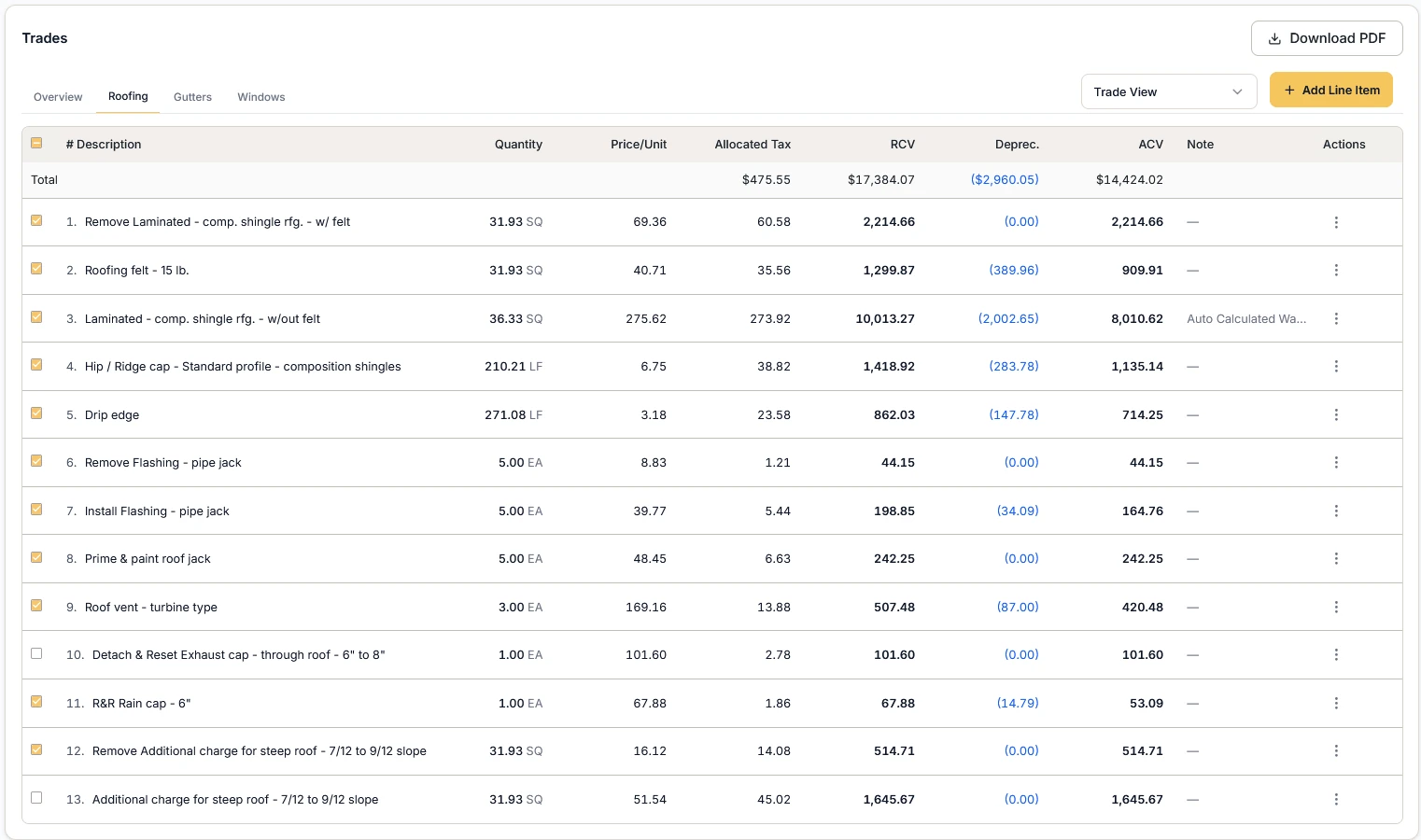
Upload the carrier's estimate and Black Bolt turns the PDF into an interactive scope of work, with RCV, depreciation, and ACV on every line.

  • Interactive scope of work
  • Check or uncheck what's included
  • Totals update instantly
Carrier estimate line items for the roofing trade, showing quantity, unit price, allocated tax, RCV, depreciation, and ACV for each line.

02 / 06

STOP RETYPING FIELD NOTES

Reconciles inspection vs claim.

Integrates with CompanyCam

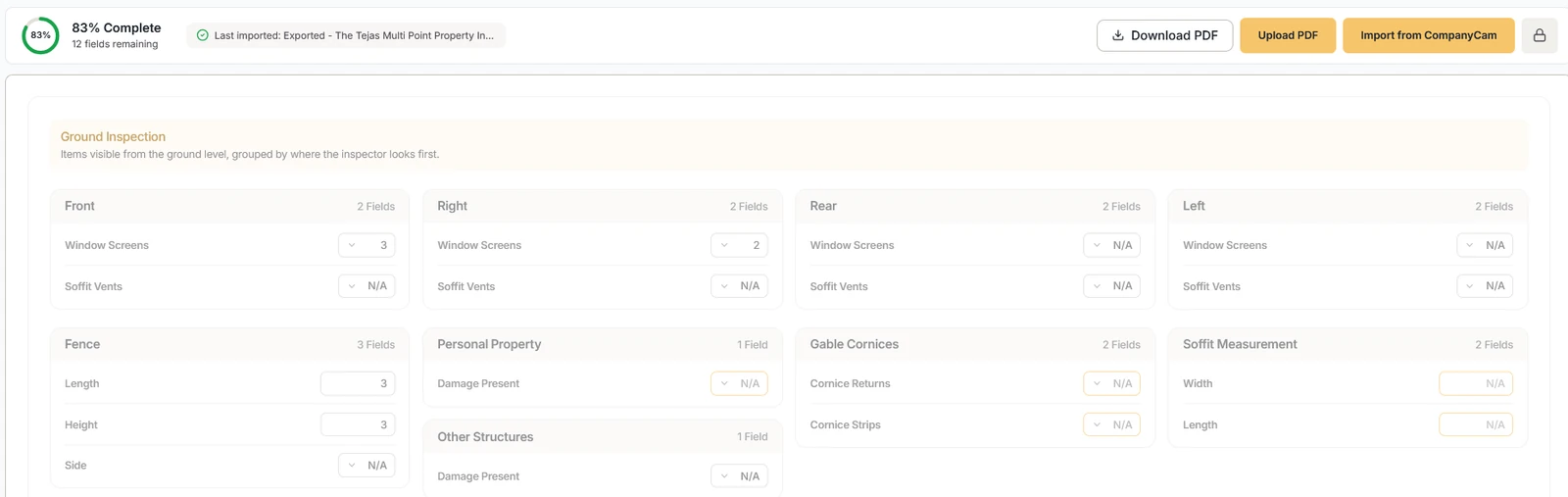
Bring the inspection in from CompanyCam or a PDF report. Black Bolt pulls the quantities out of it, so nobody types them a second time.

  • Pulls quantities from inspection reports
  • Improves accuracy
  • Converts them into material requirements
Ground inspection checklist grouped by elevation — front, right, rear, and left — with fence, gable cornice, and soffit fields, marked 83% complete.

03 / 06

MEASUREMENT INTEGRATIONS BUILT IN

No guesswork.

Integrates with EagleView and Hover

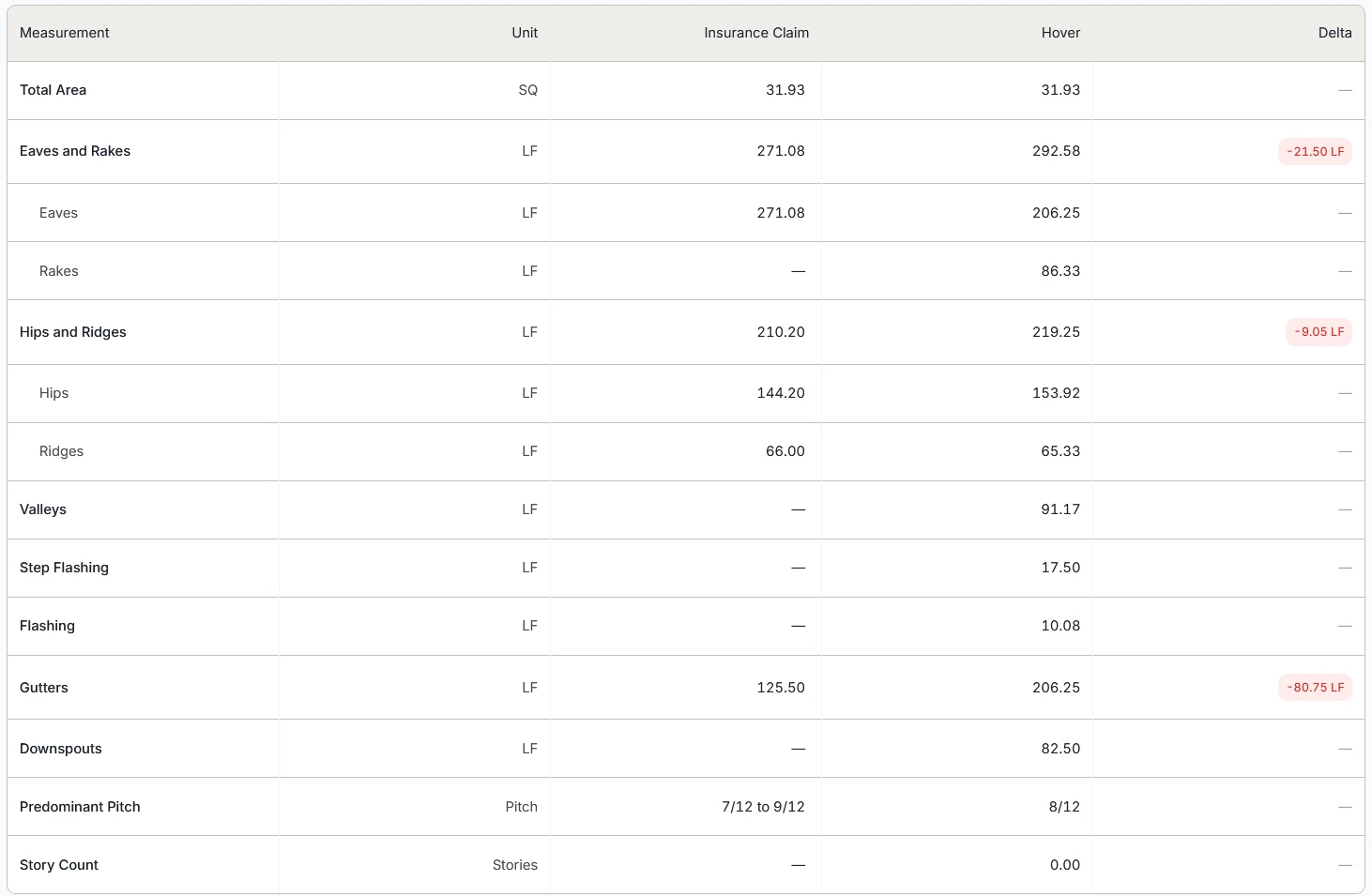
Connect EagleView or Hover and Black Bolt pulls the roof dimensions into the job, then lines them up against what the carrier measured.

  • Pulls roof dimensions from EagleView and Hover
  • Feeds directly into estimates
  • Eliminates manual entry
Measurement comparison table setting the insurance claim against a Hover report for area, eaves, rakes, hips, ridges, valleys, flashing, and gutters, with the differences flagged.

04 / 06

AUTO-BUILD HOMEOWNER QUOTES

Change the scope? The interactive estimate updates with it.

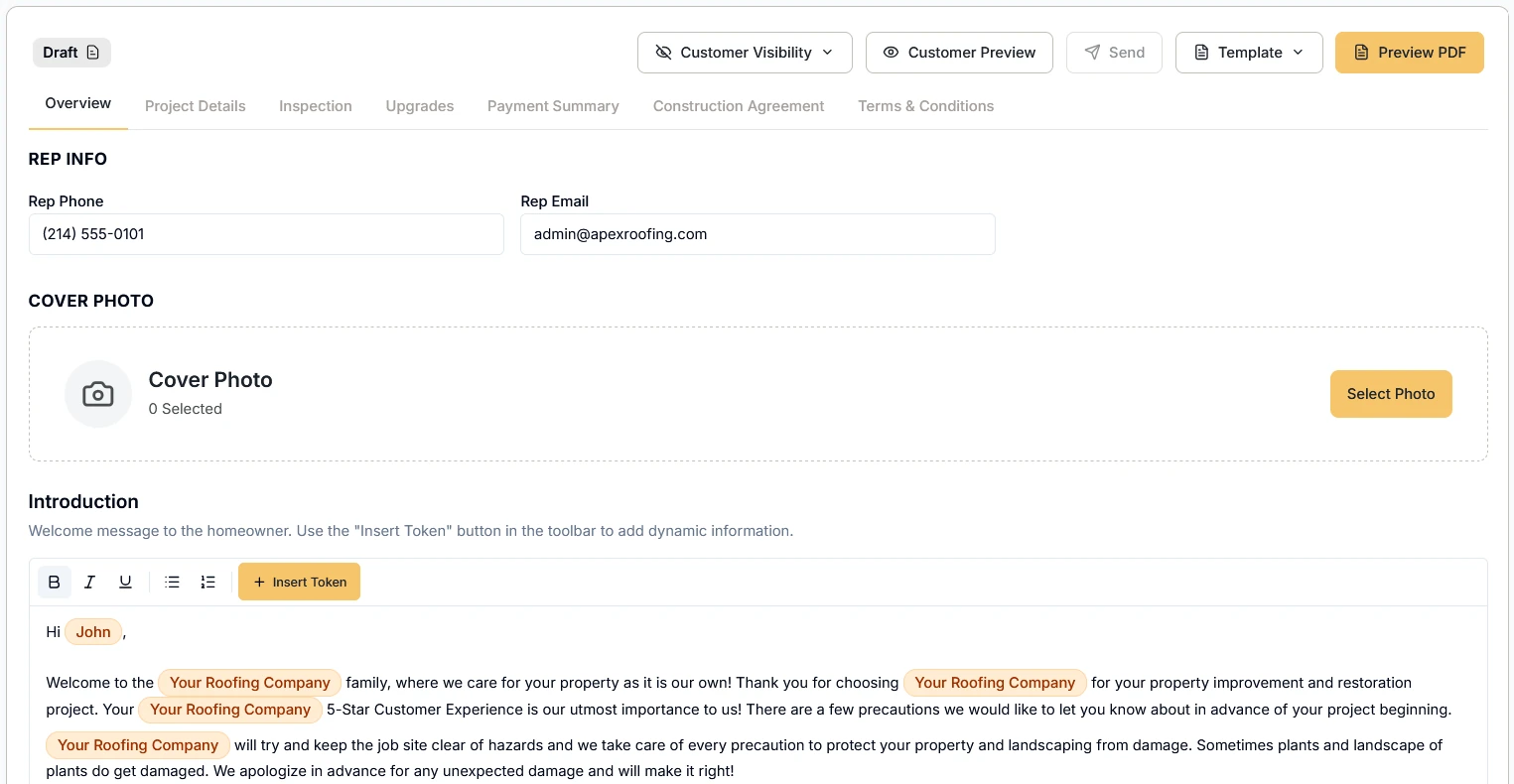
Black Bolt takes the inspection, measurements, materials, and labor already in the job and organizes them into line items. You decide what the homeowner sees before it goes out.

  • Organizes everything into line items
  • Calculates pricing automatically
  • Generates a clean, client-ready quote
Quote builder with tabs for project details, inspection, upgrades, payment summary, and construction agreement, above a templated introduction to the homeowner.

05 / 06

CATCH WHAT INSURANCE MISSED

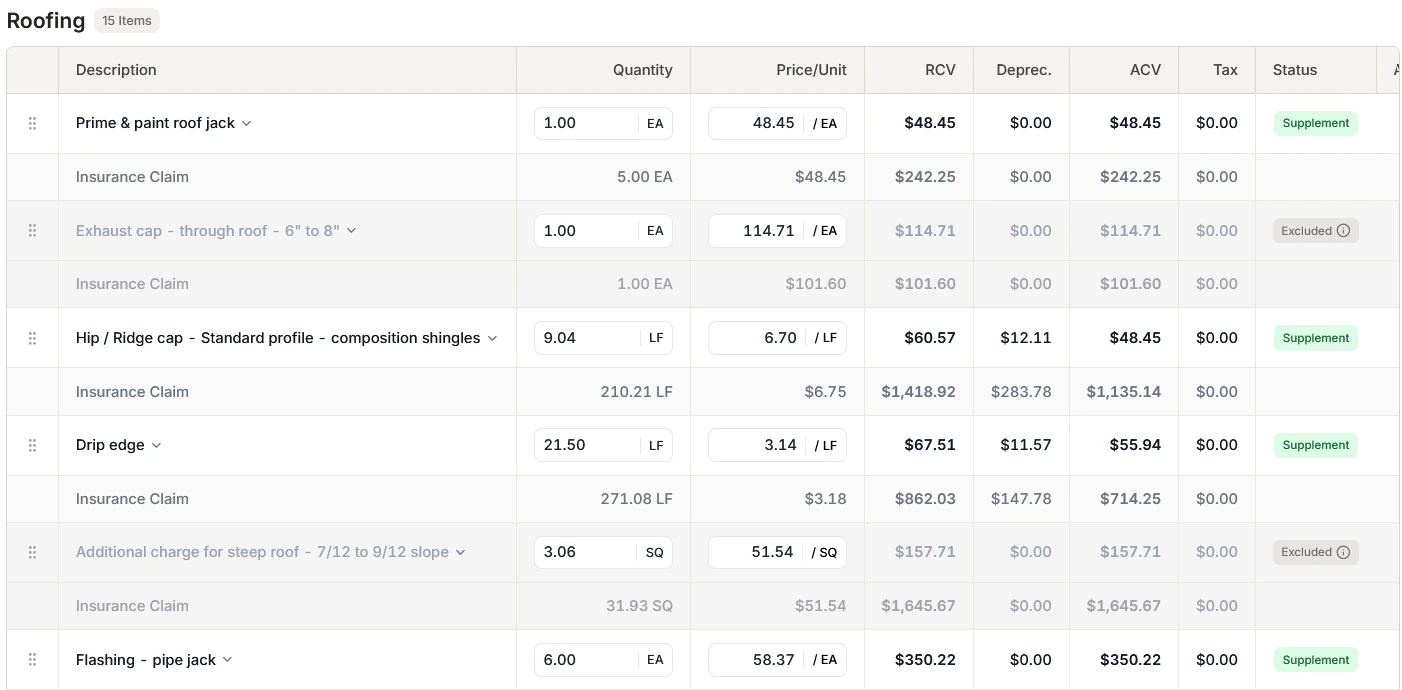
“3 vents vs 5 vents?” We catch it. You supplement it.

Black Bolt compares the inspection and measurements with the claim, line by line. Where the claim comes up short, the supplement line is already built.

  • Compares inspection vs claim
  • Flags discrepancies
  • Builds supplements automatically

ONE-CLICK SUPPLEMENTS

  1. Generate supplement docs lightning fast
  2. Attach proof
  3. Send to insurance
  4. Done.
Supplement comparison for roofing, with each scope line shown above the matching insurance claim line and differences marked Supplement or Excluded.

06 / 06

INSTANT VISIBILITY INTO JOB COSTS

Every job's numbers, in one summary.

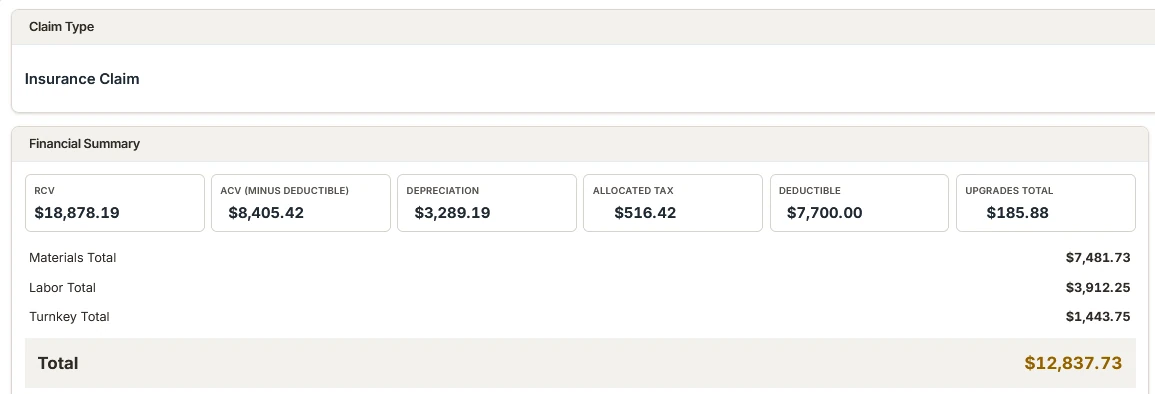
The claim's RCV, ACV, depreciation, and deductible sit beside your material, labor, and subcontractor totals. You see where a job stands without opening a spreadsheet.

  • RCV, ACV, depreciation, deductible, and upgrades at a glance
  • Material, labor, and subcontractor totals side by side
  • Drawn from the same line items as the quote and the supplement
Job financial summary for an insurance claim: RCV, ACV, depreciation, allocated tax, deductible, and upgrades, above material, labor, and turnkey totals and a project total.

ALSO IN THE SYSTEM

  • SUPPLIER & LABOR PRICING

    Your supplier price lists and labor rate cards, kept in one catalog.

  • MATERIALS

    An auto-generated materials list: quantities pre-populated from the job, priced with your supplier pricing.

  • WORK ORDERS

    The job sheet your crew works from — scope, site plan, and special instructions.

  • LABOR

    An auto-generated labor estimate, priced line by line before the job starts.

  • TURNKEY

    Gutters, fencing, siding — subcontractor trades priced into the same project.

BEFORE AND AFTER

BEFORE BLACK BOLT

  • Manual math
  • Re-checking PDFs
  • Re-entering inspection data
  • Missed supplements
  • Slower close times

AFTER BLACK BOLT

  • Click-to-build estimates
  • Instant recalculations
  • Auto-filled materials and labor
  • Supplements in seconds
  • Faster jobs, more margin
Black Bolt

IN THE BLACK. LIGHTNING FAST.

Book a discovery call. Tell us how your operation runs and we'll show you where Black Bolt fits — and say so if it doesn't.

Rather talk now? Call 888-495-BOLT